🛠️First menu
Create your first menu
Intro
Time to make your first menu! Below you can see the steps have a tabbed choice of either Editor or Config, I'd advise everyone to use the editor at first to get used to the plugin. A full breakdown can be found here (TLDR; config XML = bleh 🤮).
Create a menu
Open the editor, either with /sunscreen editor for ingame or /sunscreen web for online.
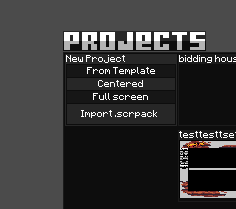
Choose one of two options (for now) to create a new menu or import an existing one!
1. Centered; creates a new empty centered menu.
2. Import .scrpack; imports existing menus, in case you bought or downloaded an existing one.
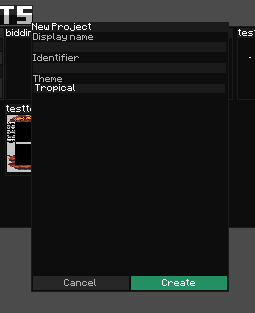
Now let's choose a name for our menu.
A name consists of a namespace and a key, in the format: namespace:key, in this case only displayname is an editable field, meaning your identifier is automatically generated.
1. Centered; Enter the display name of your menu here.
2. Import .scrpack; Confirm of course.
gegroet
Your first page
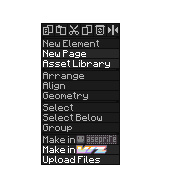
Right click anywhere in the center canvas area to bring up this context menu.
1. New Page Button; Click this New Page button to open a page creator modal.
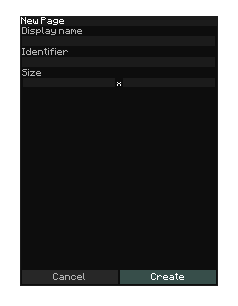
Now it's time to fill in the page name and size!
1. Page name; Insert your chosen display name for the page.
2. Page width; Enter the page width for the page, can always be changed in the properties screen!.
3. Page height; Enter the page height for the page, can always be changed in the properties screen!.
3. Confirm; And of course, click the confirm button to create the page.
a